The core idea behind Laraue Boards is that work is already happening in Telegram. A client request, a bug report, a photo of something that needs fixing — these are all issues, they just haven't been structured yet. Laraue Boards captures them directly.
Forwarding a message to the bot
The simplest way to capture a message:
- Long-press any message in any Telegram chat
- Tap Forward
- Choose @msgboard_bot as the recipient
- The message becomes an issue on your default board immediately
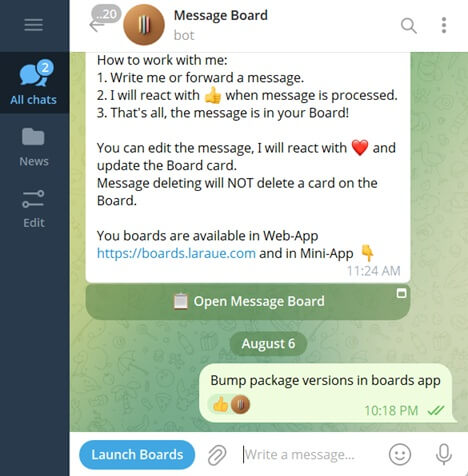
This works for text messages, photos, videos, and albums.
What gets captured
When you forward a message, Laraue Boards saves:
- The text content of the message (up to 4096 characters)
- Photos and videos — shown as thumbnails on the issue card, fetched from Telegram in original quality when you open them
- Sender name — shown on the card for context
- Timestamp — when the original message was sent
What is not captured: reactions, replies, forwarded-from attribution chains, and voice message transcriptions.
Attachments on the issue
There are no thumbnails on the board card — media only shows up once you open the issue. The detail page has an Attachments section below the content, showing every photo and video as a small thumbnail. Tap one to open the full image.
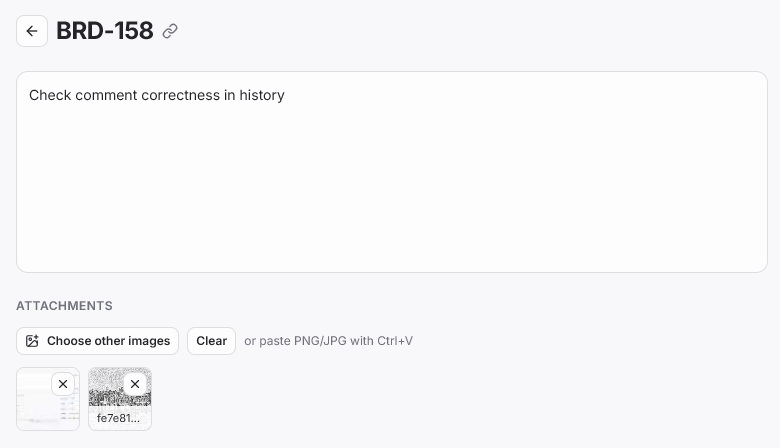
From here you can also add more images yourself — Choose other images, or paste one directly with Ctrl+V — and remove any attachment with the × on its thumbnail.
Text-only issues
A message does not need text to become an issue. A photo with no caption becomes a media-only issue — the card shows the thumbnail strip without any text below the header.
Manually created issues
Issues created by tapping + Add issue are not linked to any Telegram message. They have the same fields (content, status, attributes) but no sender or media from Telegram.