When you capture a Telegram message that contains photos or videos, those files become part of the issue.
Where media appears
There are no thumbnails on the board card — media is only visible once you open the issue. The detail page has an Attachments section below the content, showing every photo and video as a small thumbnail. Tap one to open the full image.
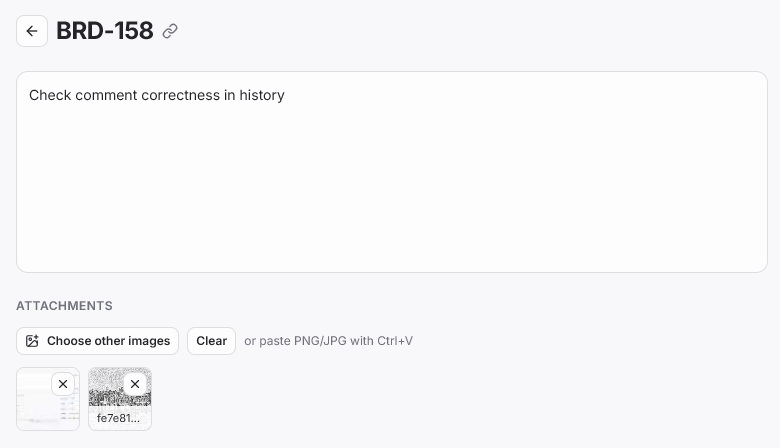
From the same section you can add more images yourself — Choose other images, or paste one directly with Ctrl+V — and remove any attachment with the × on its thumbnail.
How storage works
Original files are not stored on Laraue Boards — they're streamed from Telegram each time you open them, in their original quality. Preview thumbnails are cached on our server, so the small previews load quickly without hitting Telegram every time.
This is also true for images you add yourself through the interface, not just ones forwarded from a chat. When you upload an image directly, our bot actually sends it into a private chat that only the bot can access — that's where it's stored, the same way as any other file from Telegram. This is why attachment storage stays free.
We're planning to add the option to store files directly on our own servers, for people who don't want to depend on Telegram as storage. That option will be paid, since it's a real storage cost on our side rather than Telegram's.
Media-only issues
An issue can consist entirely of media with no text — for example, a photo of something that needs fixing with no caption. These show the Attachments section with an empty content area above it.
Access follows the issue's permissions
Media files follow the same permission model as the issue they belong to. If you don't have Read access to an issue, you can't access its attachments either.