The History tab on an issue shows what changed, when, and who changed it — as a plain, readable log, not raw data.
What gets logged
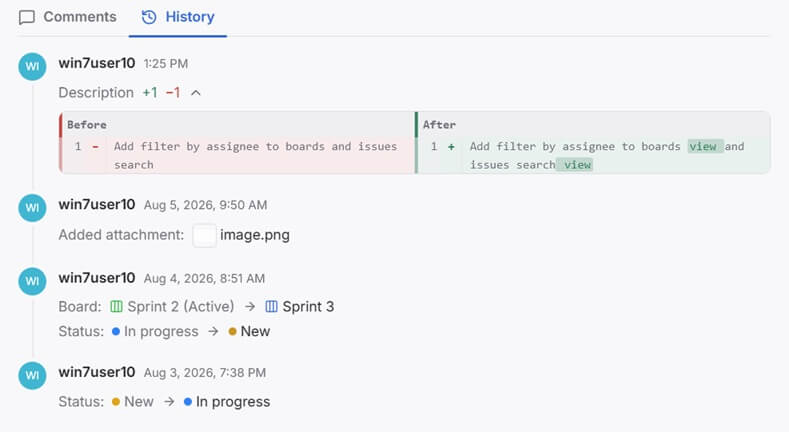
History tracks every kind of change an issue can go through:
- Space, epic, and status — moving an issue to a different space, board, or column
- Attributes — adding, changing, or removing a value on any custom attribute
- Content and description — any edit to the issue's text
- Comments — a comment being created, edited, or deleted
- Attachments — a file being added or removed
Simple value changes — a status, a board, an attribute — read as a plain Field: Old → New line. Text-heavy changes — editing the content or a comment — show a word-level diff instead: removed words highlighted under Before, added words under After, so you see exactly what changed in the text, not just that it changed.
A single entry can bundle more than one change at once — moving a board and updating its status in the same action shows up as one timestamped entry with both lines, not two separate ones.