Typing @msgboard_bot in any Telegram chat runs a search for issues right there, using Telegram's inline query feature.
Running a search
Start typing @msgboard_bot in the message box of any chat, group, or channel where you can type, followed by what you're looking for. Telegram shows matching results above the keyboard as you type — tap one of them to send it into the chat.
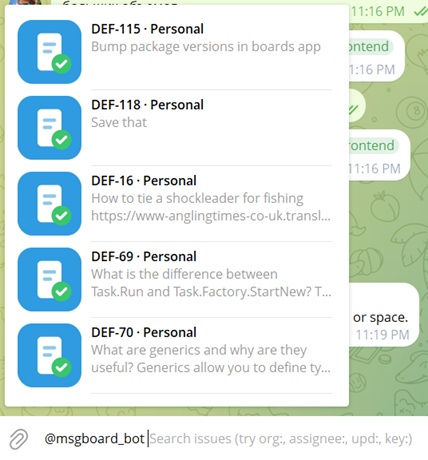
Results are scoped to the issues you have read access to, across every organization you belong to.
What you can search by
The query can mix structured filters with free text:
-
Filter tokens, written as
key:value— filter by assignee, organization, space, or how recently an issue was updated (for example, updated in the last few days versus older than that) -
An exact issue key — typing something like
UNC-24shows that issue - Free text — full-text search over the issue, with the matching part highlighted in the result so you can see why that issue matched
Filtering by organization
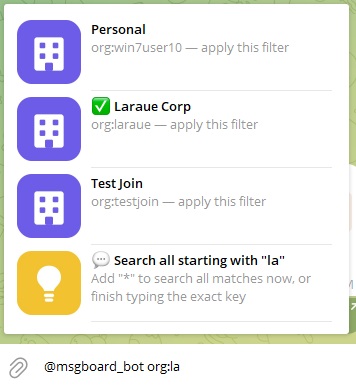
The org filter matches an organization by its key. org:laraue matches the organization with the exact key laraue.
End the value with * to match a prefix instead — org:la* matches every organization whose key starts with la, and Telegram lists them so you can pick one or keep typing to narrow it down further.
Filtering by issue key
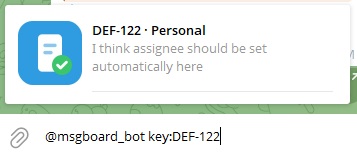
The key filter shows an issue by its key — key:DEF-122.
Filtering by assignee
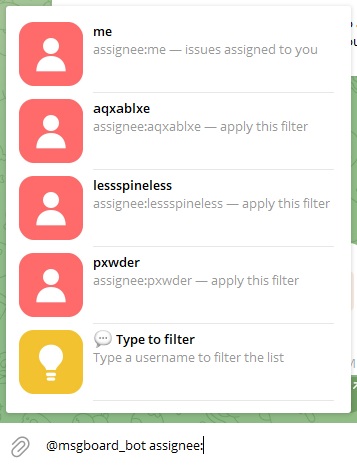
The assignee filter matches by username. Use assignee:me for issues assigned to you, or start typing a username and Telegram narrows the suggestion list as you go. The list only returns users that match the filters already in the query — for example, org:laraue assignee: returns only users from the laraue organization.
Filtering by date
The upd filter matches how recently an issue was updated. It takes a comparison operator (<, <=, =, >=, >) followed by a number and a unit — h for hours, d for days, or m for months. For example, upd:<1d matches issues updated less than a day ago.
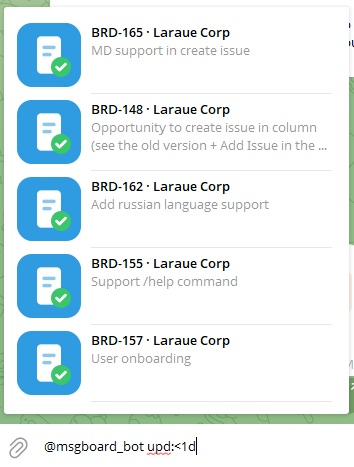
Combining filters
Filter tokens can be chained in a single query — org:laraue assignee:me upd:<7d narrows to issues in that organization, assigned to you, updated in the last week. Free text can be added to the chain too: org:la* hey searches every issue in an organization whose key starts with la for the word "hey".
What a result looks like
Every search result renders as the same issue preview card used elsewhere in the bot (in /save and /info replies too):
-
The header shows the issue key and organization, for example
UNC-24 · Laraue Corp - The body is a snippet of the issue's content centered on the match, or the start of the content for lookups that aren't text searches
-
A footer with the source chat, sender, and timestamp appears only for issues that came from a Telegram message — and shows who actually sent the original message, captured at the time it arrived, independent of who later ran
/saveon it. Issues created in the web app, or missing that information, simply have no footer
Tapping a result sends this card into the chat as a message from the bot, tagged via @msgboard_bot so everyone can see it came from a search:
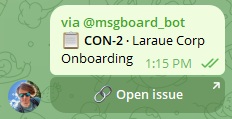
Tap 🔗 Open issue on a result to deep-link straight into the web app.