Laraue Boards runs a remote MCP (Model Context Protocol) server, so an AI agent like Claude can work with your issues directly — listing them, opening one, moving it between statuses, or leaving a comment — without you copying anything back and forth by hand.
What you need
An API key for the organization you want Claude to access. Create one from Account → API keys before connecting.
Connecting in Claude
In Claude, type /mcp to open the MCP connectors list, then choose the custom connector option and add:
-
URL:
https://boards.laraue.com/boards-mcp/mcp -
Header:
X-Api-Keyset to your API key
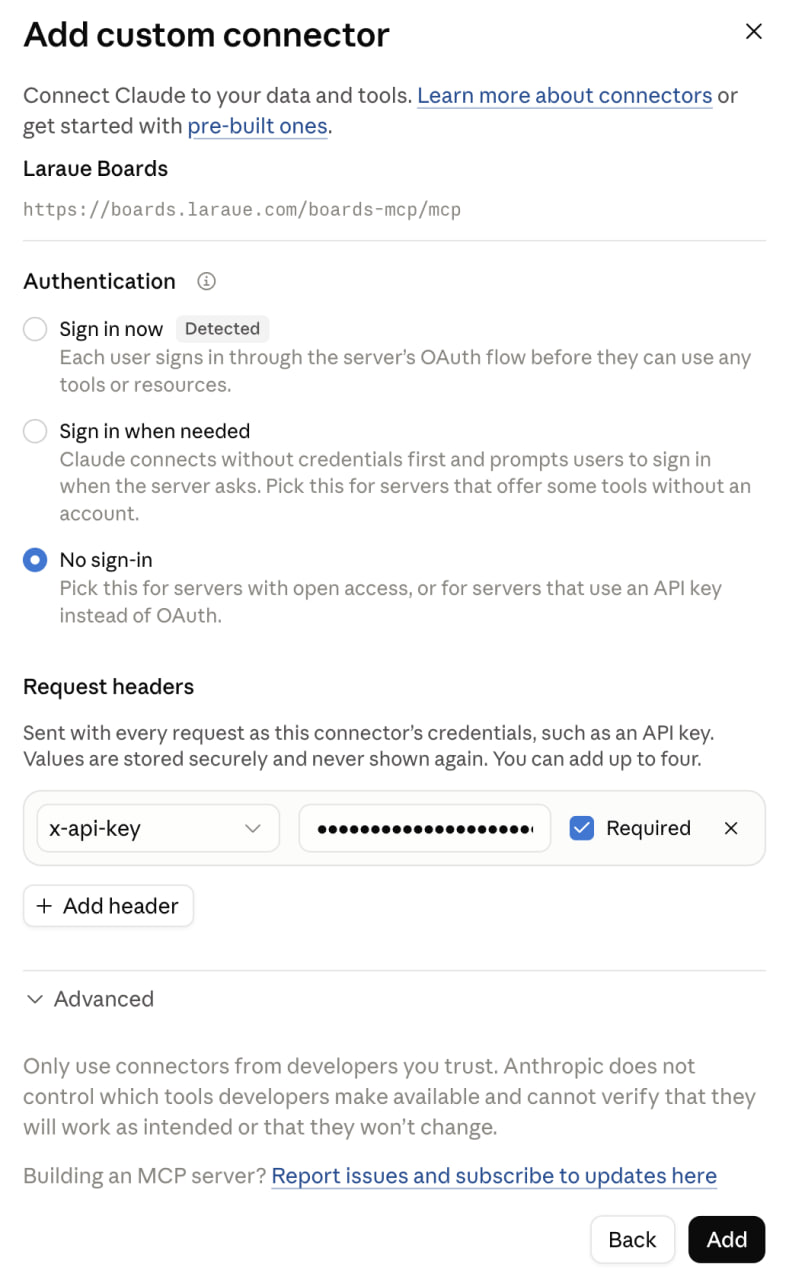
Laraue Boards is also listed on the official MCP Registry as com.laraue/boards, so any other MCP-compatible client that can browse the registry can find it the same way.
What Claude can do
Every action runs with your own permissions, live — Claude can't do anything in an organization that you couldn't do yourself there, and it can't act at all once the API key behind it is revoked.
- Issues — list and filter issues, view one in full detail, create a new one, edit its content or assignee, move it to a different status, or delete it
- Comments — add a comment to an issue, or edit one you wrote
- Organization structure — look up spaces, statuses, custom attributes, and members, so Claude can resolve names to the right ids on its own
- Attachments — download an image attached to an issue
Claude only offers actions you're actually allowed to take — for example, it won't suggest deleting an issue in a space where you don't have delete permission.
Revoking access
Access is tied entirely to the API key. Revoke it from Account → API keys at any time, and Claude immediately loses the ability to reach that organization — the same as revoking any other key.