Our backlog lives in Laraue Boards, the task tracker we are building. Boards has a remote MCP server, so an AI agent can read and update it. We use it every day now: we ask Claude Code what to work on, it looks at the board and the code, we pick a task and it gets started. This is how we got there.
Why we built it
We kept hearing about MCP servers, and the best way we know to understand a technology is to build with it. So we set ourselves a small goal: make an MCP server for Boards with Claude and see how it works from the inside. The first version took about two hours.
It is an API, written for a model
An MCP server is like an API host, but for models. Instead of documentation for a developer, every method and every parameter carries a description that tells the model when and how to use it. On top of that comes a set of instructions for the whole server, which the client receives when it connects. In C#, a tool looks like this (descriptions shortened):
[McpServerTool]
[Description("Moves an issue to a different status by id, optionally posting a comment in the same call. Requires canEdit ...")]
public Task EditIssueStatus(
    [Description("The issue's key, e.g. 'BRD-42'.")] string issueKey,
    [Description("The target status's id, from list_statuses. ...")] long statusId,
    [Description("A comment to post on the issue as part of this status change ...")] string? comment = null,
    CancellationToken cancellationToken = default)
And these are a few lines from the server's instructions:
- When the user mentions an issue, fetch it with get_issue instead of asking them to paste it.
- Tools take ids, not names: space keys from list_spaces, epic ids from list_epics,
  status ids from list_statuses, ...
- A failed call says why ('NotFound: ...', 'Forbidden: ...', or 'BadRequest: ...' with a line
  per invalid field) - fix the request instead of retrying it unchanged.
Writing the code was not the hard part. Most of the thought went into these sentences.
Two decisions: scope and access
We kept the scope small. The server covers the core flow, which is working with tasks: listing, viewing, creating, editing, moving and commenting. Managing the organization, spaces and epics is left out on purpose, more on that below.
Access goes through API keys issued in Boards at the organization level. A key gives the agent access to one organization only. The agent acts as the user who created the key, with exactly that user's permissions, and the key can be revoked at any time. Changes made through a key show up in the issue history with a key icon, so it is always clear what the agent did.
The first version was not good enough
We started with a prompt along the lines of: build an MCP host, use the API host as the reference, and suggest which methods to create. From the suggestions we chose only the core ones.
The first result had real problems. The biggest one was with dictionaries: statuses, epics, attributes, members. Almost all of them were addressed by name instead of id, so, for example, issues were filtered by status name. That is why the server instructions above now say "tools take ids, not names". Methods an agent needs were missing too: there was no way to get the list of epics, which made some basic work impossible. It took several iterations over one or two days to reach a stable version.
We had written before about why reviewing AI-generated code is expensive, so we were careful here. The tools are a thin layer over the same services and permission checks as the web API, which limits what has to be reviewed: mostly descriptions and parameters, not business logic. We reviewed the code by hand. Then we submitted the server to Glama, an MCP directory that scores servers and lists their problems, and fixed what it flagged until it showed an A rating. Only after that did we connect it to Claude Code.
Connecting it
An API key and one command:
claude mcp add --transport http boards https://boards.laraue.com/boards-mcp/mcp \
  --header "X-Api-Key: YOUR_API_KEY"
The full steps for Claude Code, Cursor and Claude on desktop are on the MCP page.
The first test, and the loop
For the first test we asked: "Check actual Laraue Boards tasks. Let's choose with you the most prioritized from them." Claude used fourteen tools. It read the board, and it also looked at the code of the task that was already in progress to see how far it had really got. Then it recommended finishing that task first, explained which other tasks depended on it, put the rest in order, and offered to create a branch and start.
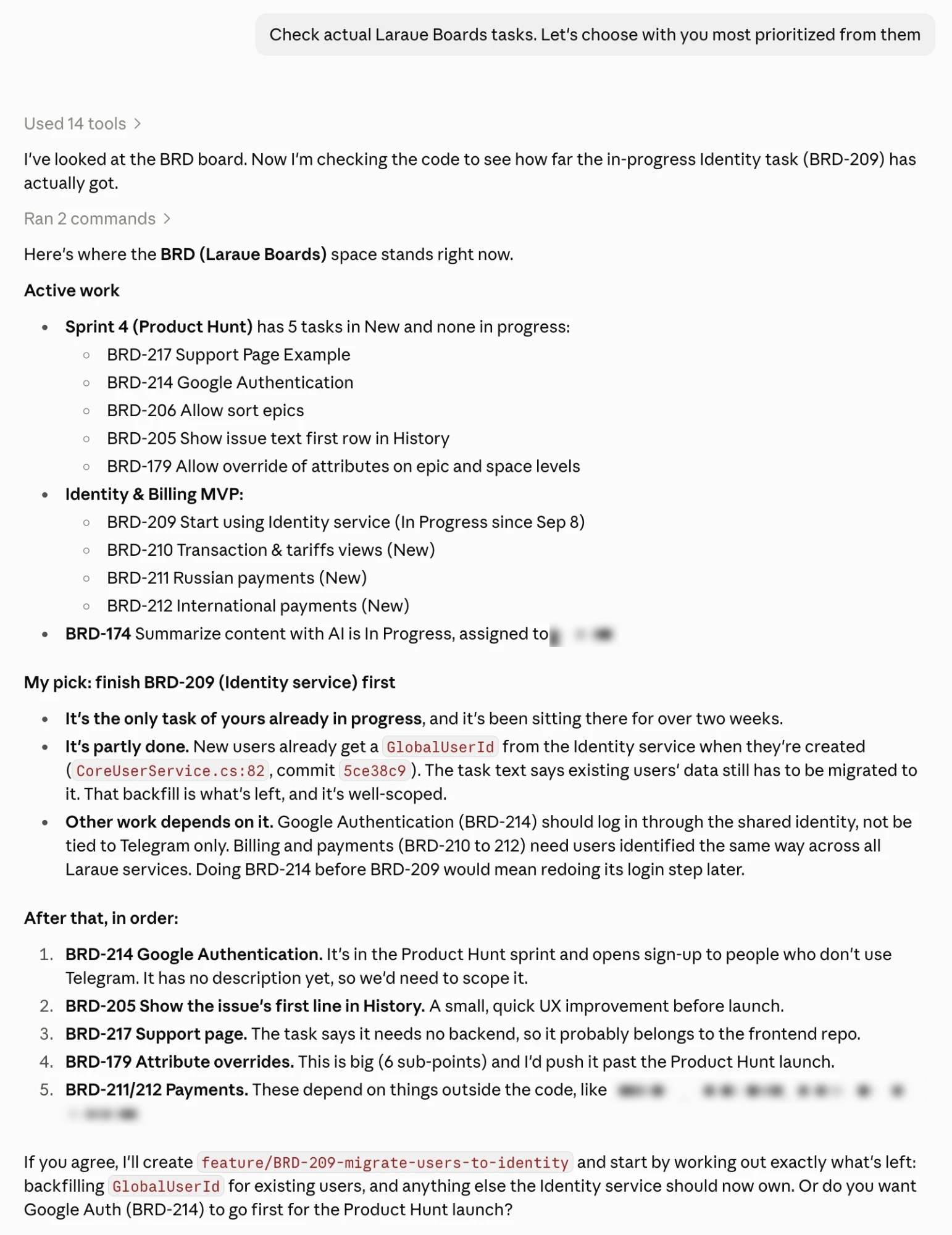
After that we asked it to move one task to In Progress and start working. When the work was done, we asked it to complete the task and suggest the next one. That is the loop we use every day now.
Sometimes we open the history log to see what changed over the last day, and sometimes the web interface to see the boards visually. But when we are working on tasks it is easier to do everything from the chat, without switching context. Tasks also arrive from Telegram: a message forwarded to the bot lands in the Backlog, ready to be picked up the same way.
What using it ourselves changed
Using the server every day showed us what was missing, and we fixed it. We added tools for the current user, the change history and comments, fixed the attachment download that returned invalid image data, and made errors readable.
That last one matters more than it sounds. When a call was missing a required argument, the SDK replaced the reason with a generic "An error occurred invoking…", and the agent could only retry blindly. Now the server checks the arguments against the tool's own schema first and answers BadRequest: Bad request with a line such as - title: Is required. A model can fix an error it can read, so the error text is part of the interface.
What it cannot do, on purpose
The server works with issues only. The agent can look up the structure around them (spaces, epics, statuses, attributes and members), but it cannot create or change it. We did not allow the most dangerous work through MCP: managing the organization, spaces and epics. A mistake there reaches far beyond one task, and we would rather have an agent that can get one issue wrong than one that can reorganize the whole board.
We may revisit this later by adding scopes to API keys, so that a key can be allowed to do exactly what you choose.
There are smaller limits too. Attachments are limited to images (JPEG and PNG, up to 3 MB), and the agent works with one issue at a time: there are no bulk operations.
Things to know before you try it
- Give the agent its own key. You can revoke it without touching your own access, and its changes are easy to tell apart in the history.
- Use permissions to limit it. If you do not want it to delete issues, use an account without delete permission in that space.
Try it
Create an API key, add the server to Claude Code or Cursor, and ask: "List the spaces in my Boards organization." If it answers with your spaces, you are connected. The backlog guide lists what to ask next, and Boards itself is at boards.laraue.com.