How the Idea Appeared
Buying an apartment is a rather complex and expensive deal. You want to choose the best option on the market and avoid mistakes with the price. With these thoughts in mind, our family began searching for an apartment on the secondary market in St. Petersburg at the beginning of 2023.
In Russia, users can search advertisements on many real estate platforms: Cian, Avito, DomClick, etc. Each has its own mechanics and set of properties. I tried to view all items that matched the parameters "metro station," "time to subway," "maximum price," "minimum area" I choose. But soon realized it was taking too much time every day.
Furthermore, we were willing to sacrifice some parameters of the property if the price is perfect. According to that, we need to view almost all listings within a certain price range and try to somehow rank them directly in the head.
I wanted to have the possibility for an absolute comparison. To take and sort by the most profitable offers according to certain filters across all platforms at once.
Yes, I understood that the most profitable offers were probably those where you'd end up with neither an apartment nor money. But there was hope that additional filters would weed out completely unrealistic options. For example, with an average price of 250 thousand rubles per square meter, offers at 150 thousand are quite suspicious.
Formulating the Task
The reasoning looked correct, and I became excited by the idea—to write an application for auto-ranking listings. And it didn't matter at all that writing such functionality would take far more time than manual viewing listings over several years.
But before writing anything, I needed to decide what I wanted to get in the end. This goal was formulated: a service should collect listings from different platforms. Then, each listing should be assigned a parameter indicating whether the apartment is worth its price. The parameter could be a number from 0 to 1. Based on this number, sorting could be done.
It remained to come up with a definition—when is an apartment worth its price? By my standards, a profitable apartment is one that, for the price per square meter, offers more than similar ones in that location. It could at least be sold without major losses.
Of course, in the real world, it's not that simple. Buildings can be different, with useful social facilities nearby or harmful factories. But I wanted to start with something and not complicate the system prematurely. For now, I settled on the following:
- Among two nearby apartments with the same renovation, the less expensive one is better.
- Among two nearby apartments with different renovations, the one that offers a lower cost per conditional unit of renovation quality is better.
The most challenging part remained—figuring out how to evaluate the renovation. Some aggregators had filters like "renovation type: euro-renovation." But such parameters were filled in manually by the listing creator and could be far from the truth. Implementation across all platforms varied or was absent altogether. That is, there were no ready-made parameters for evaluating renovation, which meant it was time to try my hand at Machine Learning - obtaining an evaluation of the renovation based on photos. After all, listings always have photos.
Training a Neural Network
In early 2023, there were no LLM models for every occasion. The main strategy was training a model from scratch or fine-tuning a similar Open Source model for a specific task. The main problem was that I was a .NET developer with nearly zero experience in ML. All I had ever done were small models for letter recognition based on the mnist dataset. And even those were trained almost the step-by-step following tutorials.
Requirements for the Dataset
To train a model, a dataset first needed to be collected. Since the plan was to recognize images from real estate sites, it was decided to download a certain number of photos from them for labeling. A small utility was written that went through Cian's pages, collected a bunch of image links (about five thousand), and downloaded them to the local disk. All that remained was to label this dataset.
Before starting the labeling process, I looked through the downloaded photos for a long time. I needed to understand what could even be seen on them. And I saw a lot—photos of trees from windows, renderings of buildings and interiors, close-up photos of bathrooms. The conclusion was made—far from all photos are relevant. Some of them wouldn't help in the evaluation. Furthermore, a certain share of images contained new apartments with rough finishes. Such listings were not wanted to be considered at all, as that is almost primary real estate with its own pricing.
Based on these conclusions, the best solution at that moment seemed to be to create three models:
-
The first would determine if it's an apartment in the photo or not. Non-apartments, or images of no value, for example, a photo of a vase, should return
false. - The second should weed out those apartments that show bare concrete.
- The third should output a rating, from 0 to 1, where 1 is the dream renovation.
Next, all three models were to be called from an ASP .NET application and return the prediction result, using the following algorithm:
public record PredictionResult
{
    public bool IsRelevant { get; init; }
    public bool HasRenovation { get; init; }
    public float Rating { get; init; }
}

var isRelevant = await model1.IsRelevantAsync(imageBytes);
if (!isRelevant) return new PredictionResult(); // Image is not relevant

var hasRenovation = await model2.HasRenovationAsync(imageBytes);
if (!hasRenovation) return new PredictionResult { IsRelevant = true }; // Image is relevant, but photo shows rough finish

var rating = await model3.GetRenovationRating(imageBytes);
return new PredictionResult { IsRelevant = true, HasRenovation = true, Rating = rating }; // Image is relevant and rating obtained
Collecting the Dataset
To speed up dataset labeling and avoid logical errors when setting features, a small editor was made on Vue.js + ASP .NET:
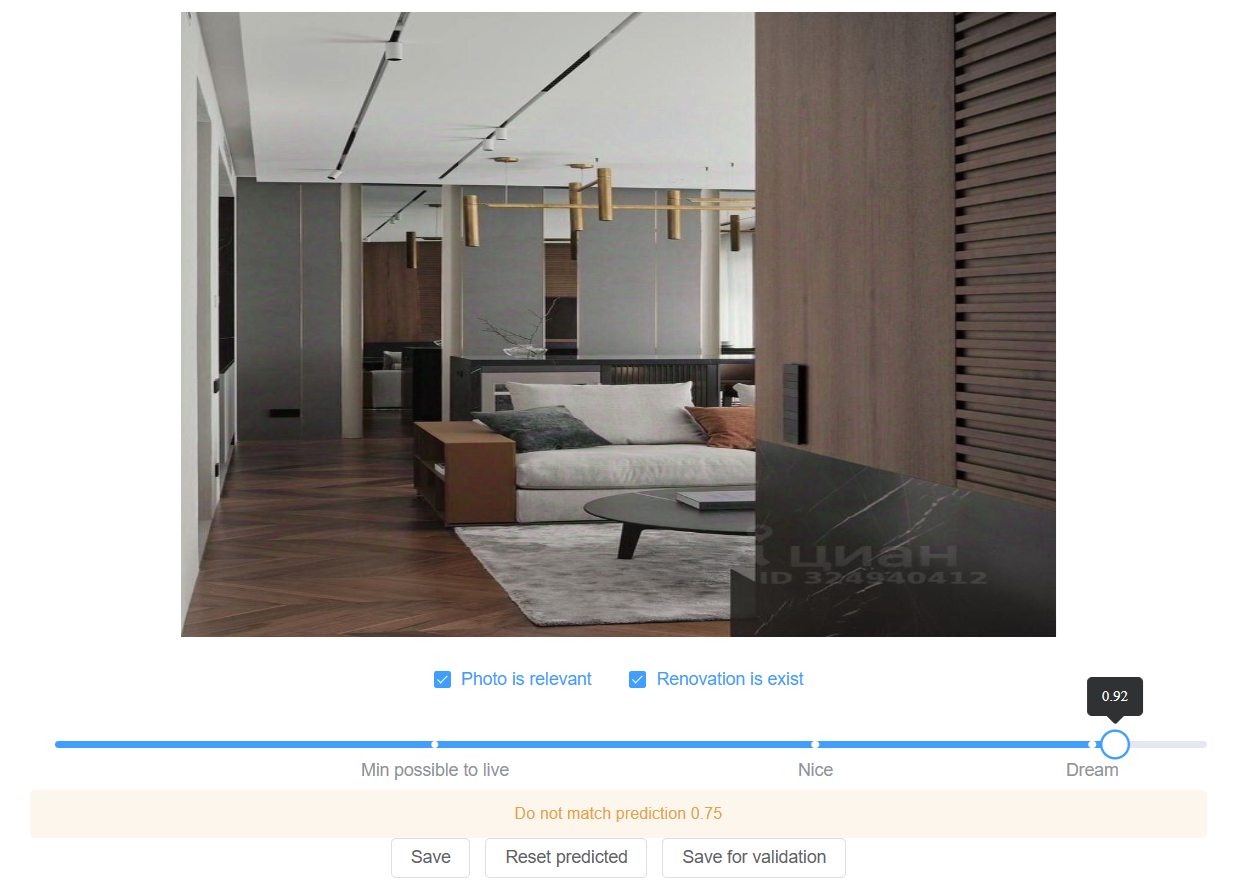
A placeholder was added to the interface for a message about what the current model thinks of the image ("Do not match predicted value 0.75"). The plan was to gather a minimal set of images, train a model, and then display the prediction result in this field during dataset labeling. This approach would allow seeing on which images the model makes the most mistakes, and the labeling process could become a bit funner. For now, this placeholder displayed a static text.
Writing the Models
After collecting a dataset of a hundred photos, it was time to start training the models. I needed to understand if this whole system even works. I took a closer look at the models planned for implementation. The first two were supposed to return a boolean answer—which resembled a binary classification task. The third was supposed to return a number from 0 to 1 - a linear regression task.
I began studying how to implement these models. Among similar tasks, I found something about predicting house prices based on a set of parameters. But that used text as input, not images. At the same time, all-models processing images were usually multi-class classifiers.
It was decided to crossbreed the found solutions for binary classification and linear regression tasks, which worked with text, and layers from some model that worked with images. I had to start somewhere. This was an option using keras + tensorflow.
Binary classification model:
inputs = keras.Input(shape=(self.image_width, self.image_width, 3))
x = tf.keras.layers.Conv2D(filters=32, kernel_size=5, activation='relu')(inputs)
x = tf.keras.layers.MaxPool2D()(x)
x = tf.keras.layers.BatchNormalization()(x)
x = tf.keras.layers.Conv2D(filters=48, kernel_size=5, activation='relu')(x)
x = tf.keras.layers.MaxPool2D()(x)
x = tf.keras.layers.BatchNormalization()(x)
x = tf.keras.layers.Conv2D(filters=64, kernel_size=3, activation='relu')(x)
x = tf.keras.layers.MaxPool2D()(x)
x = tf.keras.layers.BatchNormalization()(x)
x = tf.keras.layers.Conv2D(filters=80, kernel_size=3, activation='relu')(x)
x = tf.keras.layers.MaxPool2D()(x)
x = tf.keras.layers.BatchNormalization()(x)
x = tf.keras.layers.Conv2D(filters=96, kernel_size=3, activation='relu')(x)
x = tf.keras.layers.MaxPool2D()(x)
x = tf.keras.layers.BatchNormalization()(x)
x = tf.keras.layers.Flatten()(x)
x = tf.keras.layers.Dropout(0.5)(x)
x = tf.keras.layers.Dense(256, activation='relu')(x)
outputs = tf.keras.layers.Dense(2, activation=tf.keras.activations.softmax)(x)

model = keras.Model(inputs, outputs, name="binary")
model.compile(optimizer=tf.keras.optimizers.RMSprop(learning_rate=1e-3),
              loss=tf.keras.losses.binary_crossentropy,
              metrics=[tf.keras.metrics.AUC()])

=================================================================
Total params: 210,594
Trainable params: 209,954
Non-trainable params: 640
_________________________________________________________________
Regression model:
inputs = keras.Input(shape=(self.image_width, self.image_width, 3))

x = tf.keras.layers.Conv2D(filters=16, kernel_size=3, activation='relu')(inputs)
x = tf.keras.layers.MaxPool2D()(x)
x = tf.keras.layers.BatchNormalization()(x)
x = tf.keras.layers.Conv2D(filters=32, kernel_size=3, activation='relu')(x)
x = tf.keras.layers.MaxPool2D()(x)
x = tf.keras.layers.BatchNormalization()(x)
x = tf.keras.layers.Conv2D(filters=64, kernel_size=3, activation='relu')(x)
x = tf.keras.layers.MaxPool2D()(x)
x = tf.keras.layers.BatchNormalization()(x)
x = tf.keras.layers.Flatten()(x)
x = tf.keras.layers.Dropout(0.5)(x)
x = tf.keras.layers.Dense(512, activation='relu')(x)
outputs = tf.keras.layers.Dense(1, activation=tf.keras.activations.sigmoid)(x)

model = keras.Model(inputs, outputs, name="EfficientNet")
model.compile(optimizer=tf.keras.optimizers.Adam(learning_rate=1e-3),
              loss=tf.keras.losses.binary_crossentropy,
              metrics=[tf.keras.metrics.MeanAbsoluteError()])

=================================================================
Total params: 22,176,225
Trainable params: 22,176,001
Non-trainable params: 224
_________________________________________________________________
Connecting the Models to the Dataset Editor
Training was successfully launched on a network of 90 images (10 were used for validation). The models were saved in h5 format. Their sizes were as follows:
furniture_score.h5 - 32.8MB
is_photo_relevant.h5 - 1.76MB
is_renovation_exists.h5 - 1.76MB
Now the models needed to be connected to the dataset editor. To use them in .NET, the Keras.NET library was taken. This package allowed describing models using Keras in .NET, as well as running them. It wasn't very efficient but saved from the need to figure out Python WEB applications and their deployment.
Running a model in .NET required passing an object of type NdArray as a parameter (an analog of numpy array). However, the library only allowed getting such an object by passing a file path on disk to a special utility. Converting an existing byte array to NdArray was impossible. So, the model execution code looked as follows:
var tempFileName = $"{Guid.NewGuid()}.temp";
File.WriteAllBytes(tempFileName, imageBytes);

var image = ImageUtil.LoadImg(tempFileName, target_size: (imageWidth, imageHeight, colorsCount));
File.Delete(tempFileName);

var ndArray = ImageUtil.ImageToArray(image) / maxPixelValue;

var model = BaseModel.LoadModel(path);
model.Predict(ndArray);
The code worked. This meant that soon in the dataset labeling interface, it would be possible to see what the model currently thinks about each image. For now, the results looked more like random ones. But dataset labeling continued.
Quality Issues
Soon it became noticeable that it was challenging to objectively assign a rating from 0 to 1 for each photo. Values of 0.85 and 0.8 were very close, and the final result was more chosen based on mood. It was necessary to formulate a set of criteria for assigning a rating, but there was no motivation to come up with something, as it would require re-viewing the already labeled dataset. I wanted to see the results in action sooner, even if they are not ideal. It was decided to continue labeling based on subjective feelings and leave all quality problems for later.
The models' metrics gradually improved, but progress stopped at ~500 images. There were attempts to take a ready-made model and fine-tune it. But this only worsened the results (likely due to lack of experience). There were attempts to change the number of layers, parameters, activation functions, increase the dataset. This didn't bring any significant changes.
When increasing the number of parameters, models clearly went into overfitting. Meanwhile, a larger dataset size, all sorts of random rotations and scaling of images, adding Dropout layers did not radically change the situation. In the end, I settled on the following results with a dataset of ~2k images:
- Is it an apartment in the photo, prediction accuracy (valauc) ~ 0.92
- Is there renovation, prediction accuracy (valauc) ~ 0.95
- Determining renovation level, average error (valmae) ~0.17
Creating the Application
First Plan
It was time to write the application. I didn't want to delve into interface design, so it was decided to start by creating an ordinary Telegram bot. The user could go into its settings and choose parameters for interesting listings. And the bot would notify about new listings that matched the set parameters.
The following set of services was envisioned:
- CrawlingHost: This service would find new listings and put them in the local database, having got some renovation rating before saving.
- TelegramApiHost: Requests from the Telegram bot would go to this host, where notifications about new listings could be configured.
- WorkerHost: Periodically launched, made selections of listings, and sent them to users.
Writing the Crawler
To collect current listings, the following sequence was planned:
- On each site, it was necessary to get a static link to a list of listings, sorted by posting date, starting with the newest. Usually, links had a parameter - page number. This would need to be changed during pagination.
- When starting the crawler, all listings from the page needed to be collected. If a listing was found that was already saved in the database with the same update date, it was considered that the parser had reached previously saved listings. In this case, the process needed to be stopped and wait for the next launch.
- Also, during data collection, it was necessary to exclude the problem of race condition. This is when, during parsing, someone posted a new listing. So, when moving to the next page, the crawler could see a listing just collected on the previous page. To prevent such situations from stopping the process, step 2 was refined by introducing the concept of a "crawling session." In each session, an array of encountered listing IDs was collected. If a loaded listing was found in the list processed in this session, then it no longer stopped the process when encountered again.
- A maximum "age" threshold for listings was also provided. For example, if any found listing was already more than a month old, the parsing session needed to be stopped. Without this, on the first run, the crawler would try to go through all the platform's listings.
Writing the crawler itself wasn't difficult. It was implemented as a background task—a BackgroundJob that started every 4 hours and collected everything that appeared since the last run. The binding of the site markup to a C# object was done via the Laraue.Crawling library, which allowed defining a schema, avoiding extra spaghetti code:
public sealed class CianCrawlingSchema : CompiledDocumentSchema<IElementHandle, HtmlSelector, CrawlingResult>, ICianCrawlingSchema
{
    private static BindObjectExpression<IElementHandle, HtmlSelector> GetSchema(ILogger logger)
    {
        return new PuppeterSharpSchemaBuilder<CrawlingResult>()
        .HasArrayProperty(x => x.Advertisements, "article", pageBuilder =>
        {
            pageBuilder.HasProperty(
                x => x.ShortDescription,
                "div[data-name=Description]");
            pageBuilder.HasProperty(
                x => x.UpdatedAt,
                builder => builder
                    .UseSelector("div[data-name=TimeLabel] div:nth-child(2)")
                    .Map(TryParseDate));
            // ...
        })
        .Build()
        .BindingExpression;
    }
}
Next, a headless browser using the PuppeterSharp library would open one of the resource's pages, and data from the markup was bound to the model according to the schema.
To avoid fighting bot protection, it was decided to simply reduce requests to a level where protection wouldn't trigger. Empirically, a value of one request per minute was obtained. This was enough: the flow of listings isn't high. As a result of this step, schemas for Cian and Avito were written, each returning result according to the contract:
public sealed class CrawlingResult
{
    public Advertisement[] Advertisements { get; init; } = [];
}

public sealed class Advertisement
{
    public string Id { get; init; } = string.Empty;
    public string Link { get; init; } = string.Empty;
    public long TotalPrice { get; init; }
    public int RoomsCount { get; init; }
    public decimal Square { get; init; }
    public int FloorNumber { get; init; }
    public int TotalFloorsNumber { get; init; }
    public string? ShortDescription { get; init; }
    public DateTime? UpdatedAt { get; init; }
    public string[] ImageLinks { get; init; } = [];
    public FlatType FlatType { get; init; }
    public TransportStop[]? TransportStops { get; init; }
    public FlatAddress? FlatAddress { get; init; }
}
Before saving the result to the database, it was necessary to assign a renovation rating for the apartment. For this, individual ratings of images had to be combined into one overall rating. It was also desirable to account for model imperfections. The plan was as follows:
- It was necessary to get a rating for all photos in the listing.
- If fewer than three relevant images were found, the overall rating was set to 0, so the listing wouldn't participate in the search later.
- If images with rough finishes were found—overall rating 0.
- For the remaining images, the median was found to avoid the influence of images with sharp deviations from the average.
- Here also appeared the first concept of an "ideality" parameter - the more problems an apartment has, the lower its ideality. Problems include poor renovation, long distance to the metro, not the best metro stations, and so on. In the end, the formula for ideality was:
var totalFine = transportStopFine + transportDistanceFine + renovationRatingFine;
var ideality = 1 - totalFine;
The database began to fill with data. All that remained was to display it.
Telegram Bot Interface
According to the idea, the user could create some "selections" (Selection):
public sealed record Selection
{
    public long Id { get; set; }
    public required string Name { get; set; }
    public Guid UserId { get; set; }
    public MayBeRelativeDate? MinDate { get; set; }
    public MayBeRelativeDate? MaxDate { get; set; }
    public decimal? MinPrice { get; set; }
    public decimal? MaxPrice { get; set; }
    public int? MinRenovationRating { get; set; }
    public int? MaxRenovationRating { get; set; }
    public decimal? MinPerSquareMeterPrice { get; set; }
    public decimal? MaxPerSquareMeterPrice { get; set; }
    public decimal? MinSquare { get; set; }
    public bool ExcludeFirstFloor { get; set; }
    public bool ExcludeLastFloor { get; set; }
    public byte? MinMetroStationPriority { get; set; }
    public AdvertisementsSort SortBy { get; set; }
    public SortOrder SortOrderBy { get; set; }
    public IList<long>? MetroIds { get; set; }
    public IList<int>? RoomsCount { get; set; }
    public TimeSpan? NotificationInterval { get; set; }
    public DateTime? SentAt { get; set; }
    public int PerPage { get; set; }
}

And within the created selections, view listings:

I won't describe the process of displaying listings in Telegram in detail. There's quite a lot of code there, but it all boils down to retrieving records from the DB according to the selection filters and rendering them in the interface. In any case, the code will be available in the repository.
From this point on, listings collected from different platforms could be viewed in Telegram.
WorkerHost
It remained to refine the system by adding automatic sending of new listings according to selections. It worked in two stages:
- Those selections were selected for which it was time to send data. This was influenced by the "sending interval" parameter set by the user.
- A database query was formed to select new data. For this, listings were selected that met the selection filter conditions and where the crawledat field was greater than the date of the last auto-send for that selection.
Notification example:

All services were now implemented. They could be launched and the results observed.
Results Obtained and Apartment Purchase
The application hosts were deployed on a purchased VPS with 1GB RAM under Linux. There is no exact data left on how much RAM and CPU was spent on recognizing one image, but the numbers were quite satisfactory for the system to work correctly.
Two selections were created. The first was configured for locations most interesting to us. The second selection covered all of St. Petersburg, looking for apartments with good renovation, located near a metro station, and with a price per square meter below the market. Observations began.
The system worked. Notifications came. The renovation rating mostly filtered out unacceptable options. But fascinating applications were few. Every 4 hours a new notification arrived (or didn't arrive if nothing fell into the selection), and it was necessary to see what the system found. There were always some minuses making the options unsuitable. After a couple of weeks, this process became tedious—constantly having to go and view listings. The notification step was changed from four to twelve hours. However, in this version, there was a risk of missing perfect offers.
In the end, the purchase was decided in one day within a couple of hours. My wife, while browsing Cian, saw a new listing suitable for us in all characteristics in a good location. Within an hour, the property was viewed, and the preliminary deal was concluded the next morning. A month later, we were already moving.
This was all good, but motivation to develop the application greatly decreased. It was clear that the recognition accuracy needed to be improved somehow, but there wasn't enough knowledge for that. It was necessary to reduce the background noise from the bot—because it's not so scary to miss something important, as it is to constantly receive something irrelevant. One new idea was to look for the word "urgent" in the listing - such listings often have justified discounts.
It became unclear for whom this development was currently being done. Energy was spent on moving, summer came - time for walks - interest in development gradually faded.
Project Reincarnation
Where the New Idea Came From
2024 and 2025 were under the slogan—LLM everywhere, which provoked some rejection of this topic. Every second person now talked about how AI consults them on completely diverse questions, and CEOs of companies announced one after another that the world would soon change, and many professions would die out.
I, however, had the opinion that starting to use LLM in work would, in perspective, negatively affect the ability to write code. If LLMs become unavailable or prohibitively expensive, those who can still code independently will be best positioned to adapt and thrive.
However, I couldn't avoid using LLMs forever. Every month, the feeling of search engine degradation grew. Perhaps these were subjective feelings, but finding answers to questions was becoming more and more difficult.
I asked acquaintances about what they use. Programmers mostly used DeepSeek, others used some dubious Telegram bots with names like "Free ChatGPT 4 Bot."
I was lucky to come across the Ollama project, which allowed running Open Source models locally. And I really liked this concept, as in this case all data was always on the local computer. It's like an encyclopedia of the entire internet in the form of one file—and with no ads. Moreover, if models somehow change over time and degrade, your local one will remain as it was.
Many models were tried, in the end, two remained in constant use: qwen3-coder:30b for programming questions and gemma3:12b for everything else. The logical next question was - could an LLM evaluate renovation from a photo, and what would the results be?
Experiments with Ollama
The first idea was to simply ask one of the models what it sees in the photo, giving it a URL of an image from Cian. To my surprise, the model described in detail what was in the photo, almost a complete match. Another URL was sent—again a detailed description of the apartment, but almost nothing matched.
It turned out that the model couldn't even load an image by URL, although it always returned an answer. Based on the fact that the address contained "cian," it simply assumed it received a photo of an apartment and generated some random results.
In the end, I studied the documentation and discovered that only some models could work with images. And they needed to be passed as a separate property in the form of a base64 string. Furthermore, it turned out that Ollama supported the structured output function, which allowed specifying the contract of the object the model should return for a given query.
As a result, such a request was composed that asked the model to return data on the photo in the desired format:
{
    "model": "qwen2.5vl:3b",
    "prompt": "Analyze this image and determine if it depicts a flat interior...",
    "stream": false,
    "images": ["base64ImageString"],
    "format": {
        "properties": {
            "RenovationRating": {
                "type": ["number"]
            },
            "Tags": {
                "items": {
                    "type": ["string"]
                },
                "type": ["array"]
            },
            "Description": {
                "type": ["string"]
            }
        },
        "type": ["object"]
    }
}
A long set of hints was passed in the prompt, so the model understood what should increase the rating and what should decrease it. For example, the use of expensive materials is a plus, while exposed utilities is a minus. In addition to hints, it was specified what each of the requested properties represented, as well as rules for when the model should consider an image irrelevant and return null. The renovation rating range became an integer 0–10, instead of a floating 0–1, as it was found that models hallucinated less when working with integers.
The response looked this way:
{
    "model": "qwen2.5vl:3b",
    "response": "{\"Tags\": [\"Empty room\",\"No furniture\",\"Unfinished walls\",\"No design solutions\",\"No color scheme\"],\"Description\": \"The image shows an empty room with unfinished walls and no furniture. The room appears to be in the process of being renovated, as the walls are not yet painted and there are no visible design solutions or color schemes. The lack of furniture and the unfinished state of the walls suggest that the flat requires significant renovation before it can be lived in.\"}"
}
The rating was indeed performed. The only question was how well and which model had the best results.
Choosing a New Model
It was decided to do a small test: select 20 diverse images and get rating results from each of the models. The test itself looked like this:
[Theory]
[InlineData("qwen2.5vl:7b")]
[InlineData("qwen2.5vl:3b")]
[InlineData("gemma3:12b")]
[InlineData("gemma3:4b")]
[InlineData("llava:7b")]
[InlineData("llama3.2-vision")]
[InlineData("qwen3:8b")]
[InlineData("qwen3-vl:8b")]
public Task ModelsTest(string model)
{
    return RunTest(model, Prompts.Prompt1);
}
The test body contained a sequential launch of recognition on the model for each of the predefined images and comparison of the obtained results with a standard:
private async Task RunTest(string model, string prompt)
{
    var errors = new Dictionary<string, Result>();
    foreach (var image in _testImages)
    {
        var filePath = "C:\\images\\" + image.Key;
        var fileBytes = await File.ReadAllBytesAsync(filePath);

        var result = await _predictor.Predict(
            model,
            prompt,
            fileBytes);

        errors.Add(image.Key, new Result
        {
            Tags = result.Tags,
            Diff = Math.Abs(result.RenovationRating - image.Value),
            Excepted = image.Value,
            Actual = result.RenovationRating,
            IsRelevant = result.IsRelevant,
        });
    }

    _outputHelper.WriteLine($"Average error: {errors.Values.Average(x => x.Diff)}");
    _outputHelper.WriteLine($"Error > 10%: {(errors.Values.Count(x => x.Diff > 1) / (double)errors.Count):P}");
    _outputHelper.WriteLine($"Error > 20%: {(errors.Values.Count(x => x.Diff > 2) / (double)errors.Count):P}");
    _outputHelper.WriteLine($"Relevant errors: {(errors.Values.Count(x => x.IsRelevant == (x.Excepted != 0)) / (double)errors.Count):P}");

    foreach (var error in errors)
    {
        _outputHelper.WriteLine(
            $"{error.Key}: {error.Value.Diff} ex: {error.Value.Excepted} act: {error.Value.Actual} tags: {string.Join(',', error.Value.Tags)}");
    }
}
Test output:
Average error: 1.55
Error > 10%: 30.00%
Error > 20%: 20.00%
Relevant errors: 25.00%
2612468440-4.jpg: 0 ex: 3 act: 3 tags: Old furniture,Worn carpet,Wallpaper,Simple lighting,Basic layout
2612468528-4.jpg: 0 ex: 3 act: 3 tags: Old tiles,Basic fixtures,Needs paint,Simple layout,Basic lighting
2612468865-4.jpg: 5 ex: 0 act: 5 tags: Neutral colors,Simple design,Clean lines,Functional layout,Needs minor updates
...
It was interesting to understand not only the average error but also how many gross errors the model makes, when, for example, it evaluated renovation where it shouldn't have at all. Furthermore, models that required a lot of resources or worked slowly were not considered. In the end, the winner in terms of price-quality ratio was qwen2.5vl:7b. Evaluating one image took about five seconds on an RTX4070.
Improvements in the Recognition Algorithm
The obtained results were clearly better than the self-written model. But I wanted to understand what else could be improved.
From the test output, I noticed that quite a few errors occurred in images that had little information in principle for evaluation—like a photo of an empty wall with a painting. Although the image was generally relevant.
This gave rise to the idea that it would be cool to combine all photos and evaluate the entire listing at once. Then the model would have more information and less chance of making a mistake. This should also work faster - model runtime didn't strongly correlate with input file size. And the number of recognitions was reduced to one per entire apartment.
The algorithm was simple—all listing photos were combined into one long image separated by black stripes. It was added to the prompt that it was necessary to evaluate the passed collage of images, separated by black lines.
This worked—the overall rating increased. However, a problem appeared: the model began to periodically hallucinate and endlessly generate tags. Prompts saying to return no more than 10 tags sharply reduced the apartment rating result and didn't always save from hallucinations.
In the end, a magical prompt suggested by the model itself helped return exactly no more than 10 items. This removed hallucination without significantly reducing accuracy.
In general, all this development through prompts was, of course, so-so. Absolutely no determinism, any changes could sharply worsen the result. Fortunately, the written tests allowed at least seeing the overall picture and not making completely wrong decisions.
Integration into the Project
The new core system for image recognition was ready for integration into the application. However, now running the model required a powerful video card, and renting a server with a GPU was expensive. It was decided that the home computer would handle all the heavy lifting. For this, the project needed to be refined.
- All work requiring a video card was moved to a separate host - GpuWorkerHost. Parsing was refactored and now didn't try to get the renovation rating immediately, but simply put its results in the database. Then GpuWorkerHost would look at listings with unassessed ratings, perform the assessment, and update the results in the DB.
- An ApiHost was added—I wanted to display the results nicely on a normal frontend.
- WorkerHost got a new job—it needed to look at listings that were rated and set a flag for them—ready for API. Moreover, tasks for periodically deleting from the database those images that were no longer available and for marking a deletion flag for those listings that no longer had a single active image were added to this host.
Frontend Development I've always found it hard to come up with interfaces. Therefore, I requested several different layouts for this task from qwen3-coder:30b: 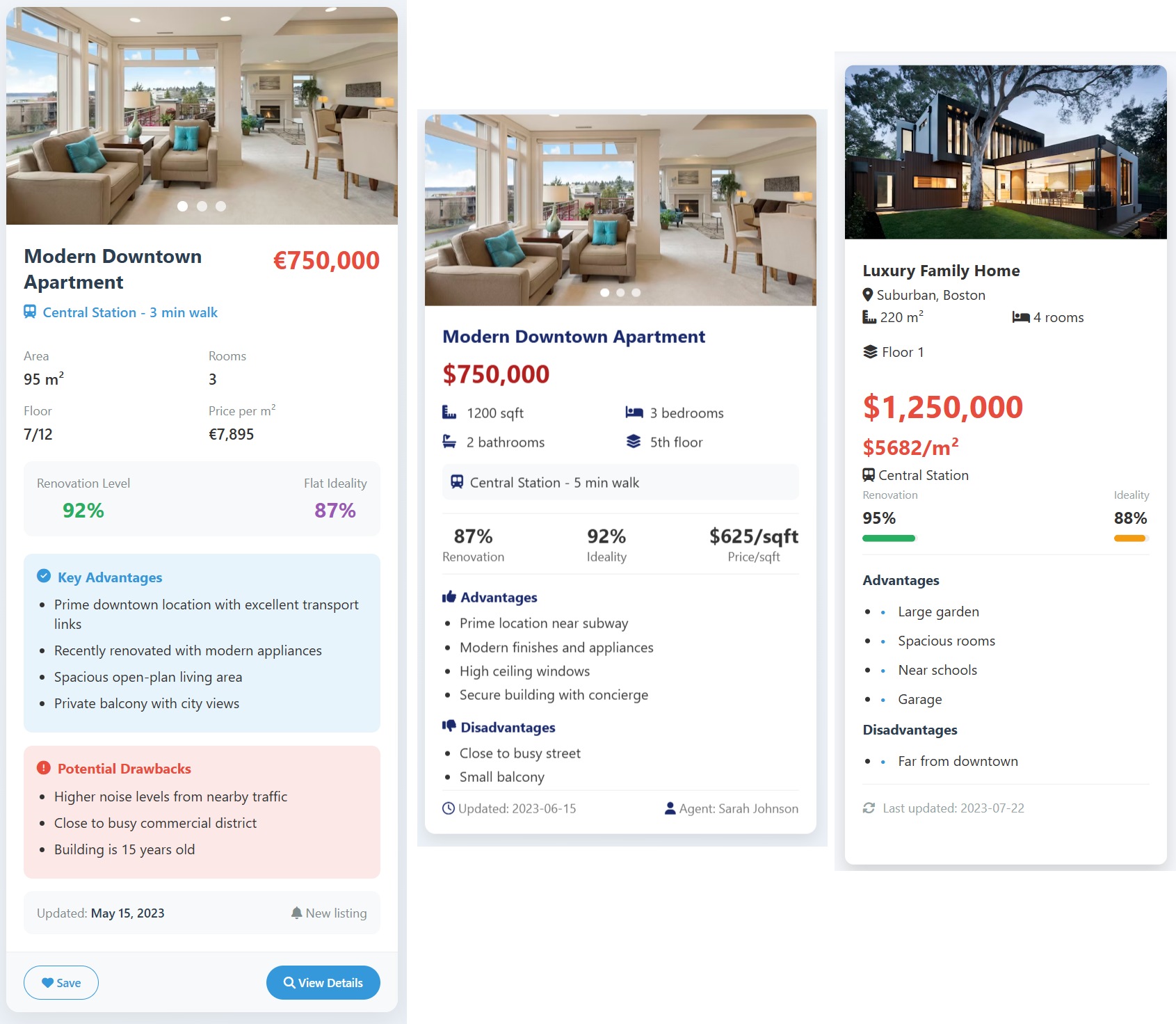
These layouts were then manually combined and refined with a file.
Host Deployment
It was decided to deploy only the ApiHost to the server, to avoid extra spending on computational resources. All other hosts didn't require constant running. Therefore, they could be launched locally at any time so they would collect new listings, rate them, and put the results in the database.
Results and Plans
The initial plan - to sort apartments by the most profitable offers - still wasn't fulfilled. But a step was taken in that direction: it was decided to find apartments located nearby on the same street and show if it's a profitable deal by comparing their prices and renovation. But this only worked when there were many listings on the street, and there was something to compare with. Properly, it's necessary to use a geo-database, thanks to which comparison could be made precisely by the nearest buildings, not only those on the same street.

Further improvements were swirling in my head:
- Compare stated attributes with the listing text. Often users write one thing in the characteristics and something completely different in the description—a trick to attract attention. Such listings should preferably be immediately thrown out of the results.
- Load databases of buildings scheduled for renovation, and reduce the final rating or show warnings about deal danger.
- Merge duplicates by parameters, cleaning up selections.
- Search for apartments not only for purchase but also for rent.
- Do so-called model distillation. This is when a small model is trained on the results of a large one. Then GpuHost would be on the server and wouldn't have to be run on the local computer.
Ideas kept coming one after another, but a problem appeared—it seems I got tired of developing this project again. Currently, it couldn't be applied in any way; no apartment purchases were foreseen. Nevertheless, it looks interesting and I want someone to be able to use the knowledge accumulated in it. I posted the source code on GitHub, in case anyone wants to familiarize themselves with the implementation of all the functionality in more detail. The Frontend is missing from the repository; it will need to be written independently if necessary.
Well, if you just want to see the obtained result, it's available here. The project was initially made for St. Petersburg, so there's the most data there. Moscow and Volgograd were added later, to make sure the project could be scaled.