Building a C# web scraping tool is a project I've come back to across five years and two fundamentally different approaches. What started as a no-code SaaS application — with a visual schema builder, user accounts, a wallet, and webhook delivery — eventually became Laraue.Crawling: a strongly typed open-source .NET library. This article covers the full arc: the original idea, the first implementation's architecture and tests, where it broke down, and why abandoning the interface to build a library was the right call.
The Original Idea: No-Code Crawling for Non-Developers
The idea surfaced early in my career as a software engineer. Client after client needed data extracted from legacy systems or public sources — each request was the same workflow: explore the site layout, write boilerplate selector code, map to a data model, schedule, deliver. Every time from scratch.
The vision was to eliminate the boilerplate entirely. If a user could describe which HTML blocks contain the required data through a UI, the extraction code could be generated automatically. No programming knowledge required.
To test feasibility, I built a minimal proof of concept: an API that fetched a page's raw HTML, injected a JavaScript snippet into the frontend that drew a red rectangle around any hovered element, and logged clicks to the console. It worked on simple static pages — enough to commit to a full implementation.
The First Application: Architecture and Features
After many iterations, the application took shape as a three-step workflow:
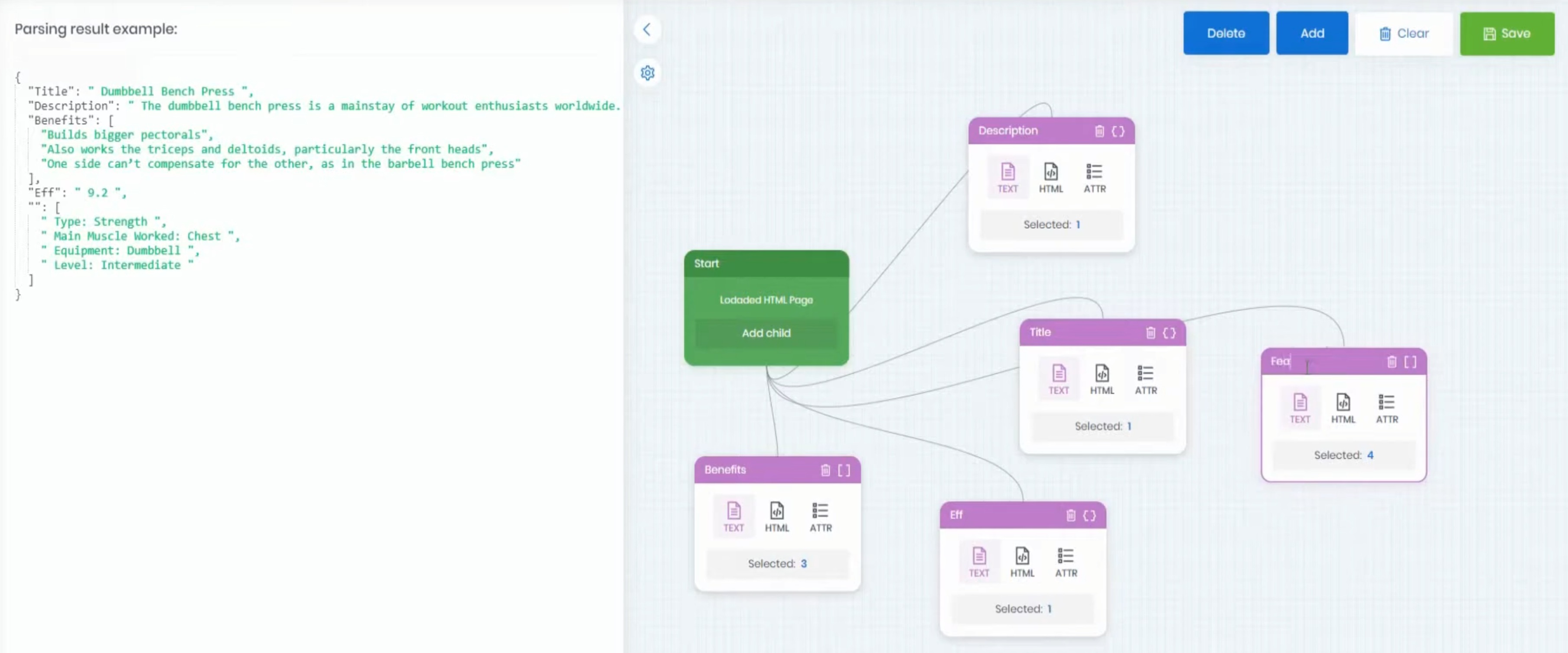
Step 1: Build the schema. Users opened a page URL in the app, hovered over elements, and clicked to mark data fields. The app captured CSS selectors automatically and built a ParsingSchemeInfo — a structured description of what to extract and how.
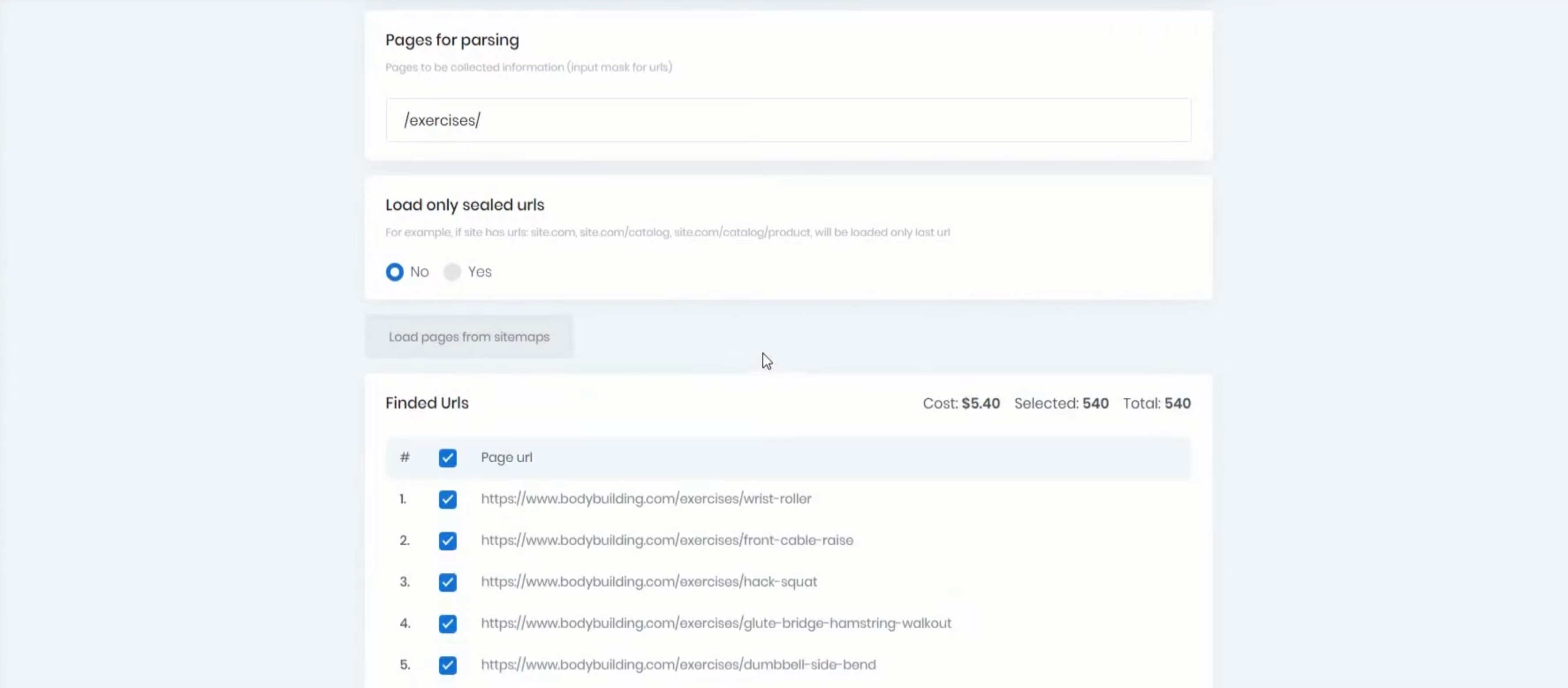
Step 2: Choose pages. Once a schema was ready, the app loaded the site's sitemap in the background. Users could select pages by pattern — crawl all URLs matching /products/*, for example — rather than specifying each one manually.
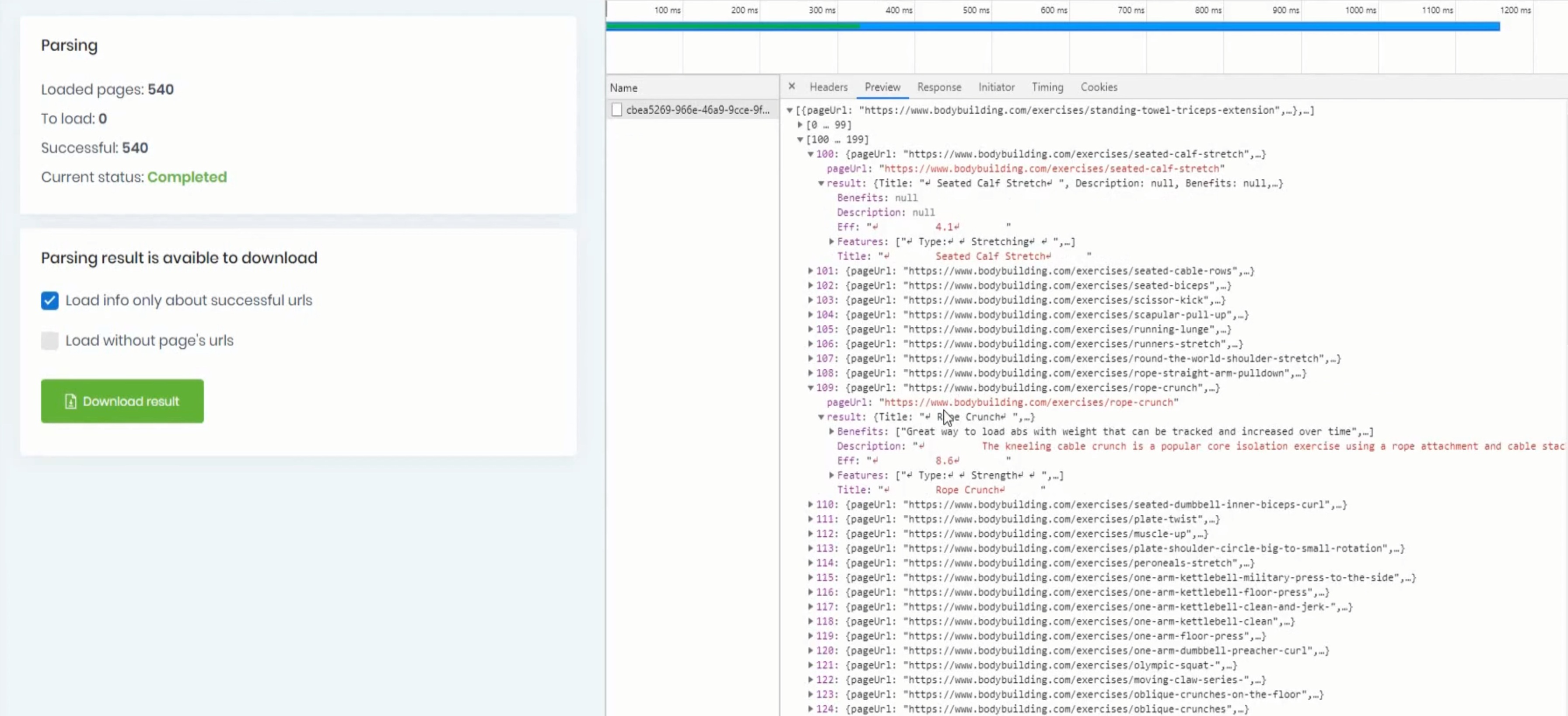
Step 3: Run and collect results. Crawling ran on a manual trigger or a schedule. Results were delivered as CSV, JSON, or via webhook to an endpoint of the user's choice.
How the Schema Engine Worked
The core of the application was the parsing schema engine. A ParsingSchemeInfo held a tree of blocks — each block described one extraction rule. There were three block types:
ItemBlock — extracts a scalar value or a list of values from a CSS selector. The IsSingle flag controls whether the first match or all matches are returned. An optional Attribute property extracts an element attribute (like src or href) instead of text content.
ObjectBlock — extracts a structured object or array of objects. Child ItemBlock definitions describe the properties of each object.
KeyBlock — groups child blocks under a named key in the output JSON, without adding a selector of its own.
The ParsingSchemeTests from the original repo (source) show exactly how these composed:
// ItemBlock: extract text from all matching divs
var scheme = new ParsingSchemeInfo
{
    Entities = new[] { new ItemBlock { Name = "F1", HtmlSelector = "div", IsSingle = false } }
};
var result = await scheme.ParseDataAsync("<div>12</div><div>13</div>");
// result["F1"] → JArray [12, 13]

// ItemBlock: extract an attribute
var scheme = new ParsingSchemeInfo
{
    Entities = new[] { new ItemBlock { Name = "Image", HtmlSelector = "img", IsSingle = true, Attribute = "src" } }
};
var result = await scheme.ParseDataAsync("<img src=\"test\" />");
// result["Image"] → "test"

// ObjectBlock: extract structured rows from a table
var scheme = new ParsingSchemeInfo
{
    Entities = new[]
    {
        new ObjectBlock
        {
            Name = "Value", HtmlSelector = "tr td", IsSingle = false,
            Entities = new ItemBlock[]
            {
                new() { Name = "H1", HtmlSelector = "h1", IsSingle = true },
                new() { Name = "H2", HtmlSelector = "h2", IsSingle = true },
            }
        }
    }
};
// result["Value"] → [{ H1: "Record1_h1", H2: "Record1_h2" }, { H1: "Record2_h1", H2: "Record2_h2" }]
The schema also supported four ParsingMode variants for controlling what text was extracted from a matched element:
| Mode | Returns |
|---|---|
InnerText |
Text content only, tags stripped |
InnerHtml |
HTML inside the element |
OuterHtml |
The element itself including its tag |
InnerTextInOriginalTag |
Text content wrapped in the original element's tag |
This last mode was useful for preserving semantic context when re-injecting scraped content into another site.
The Wallet System: Credits for Crawling
The application was designed as a SaaS. Crawling operations consumed credits from a user's wallet. The wallet had two balance types: real balance and bonus balance (promotional credits). Bonuses were consumed first — only after bonuses were exhausted did the real balance decrease.
The WalletTests (source) reveal a sophisticated reserve-commit-rollback transaction pattern:
// Reserve funds before starting a crawl job
using var reservedTransaction = await _mediator.Send(
    new ReserveBalanceCommand(userId, transactionId, TransactionReason.ParsingWithdrawal, 30M));

// If the job succeeds, commit — balance decreases permanently
var balanceChange = await reservedTransaction.CommitAsync();
// balanceChange.Difference → -29.7M (real), balanceChange.BonusDifference → -0.3M (bonus consumed first)

// If the job fails, Dispose() rolls back — balance is restored
reservedTransaction.Dispose(); // idempotent — safe to call twice
The reserve step locks the funds so the user can't spend them elsewhere while a job runs. The commit step writes the permanent transaction. The rollback (via Dispose) is idempotent — calling it twice was explicitly tested to ensure correctness.
The system also handled concurrent access correctly. A stress test sent 100 simultaneous reserve commands for different amounts and confirmed the final balance was exact after all commits:
var reservedTransactions = await Task.WhenAll(
    Enumerable.Range(1, 100)
        .Select(i => _mediator.Send(new ReserveBalanceCommand(
            userId, transactionId, TransactionReason.ParsingWithdrawal, 0.01M * i))));

await Task.WhenAll(reservedTransactions.Select(x => x.CommitAsync()));

var balance = await _mediator.Send(new GetBalanceCommand(userId));
Assert.Equal(49.8M, balance.Total); // 100 - sum(0.01..1.00) = 49.8 - 0.2 bonus = 49.8
This was MediatR-based, with WebSocket notifications pushed to the user's browser when balance changed — the IUserWebSocketHandler mock in the tests captured those calls.
Where It Broke Down
Problem 1: JavaScript Rendering
The original schema builder worked by injecting JavaScript into a page rendered in an iframe inside the app's frontend. This worked fine for static HTML sites. But many real-world sites load their content dynamically — the injected script ran before the content existed, so there was nothing to click.
The fix was to split into two versions: a web version for static pages, and a desktop version (using a real browser) for JavaScript-rendered pages. This added friction for users who had to switch tools mid-project if they hit a dynamic page.
Problem 2: Anti-Bot Measures and Proxy Management
Pages that blocked crawlers were the harder problem. Cloud proxy services existed but cost money, and without revenue the app couldn't justify the expense. I wrote several proxy rotator implementations, but validating whether a given proxy was actually working — and whether a request through it had succeeded — was genuinely difficult. Some proxies appeared functional but returned cached or manipulated responses. Others silently dropped requests. This was a problem I didn't know how to solve reliably within the project's constraints.
Problem 3: The Tool Was for Developers Anyway
After building the visual schema builder and the full SaaS infrastructure, I looked at who was actually using it. The users who got value from it were comfortable with selectors — they were effectively developers. Non-technical users found the concept of a CSS selector confusing even with the visual helper, and giving up control over proxy rotation and browser behavior was a dealbreaker for technical users with complex targets.
The application was solving a problem for a user who didn't fully exist.
Rethinking: The Library Concept
A break from the project led to a clearer perspective. What I actually needed — for other pet projects — was a reliable C# tool for extracting structured data from both static and JavaScript-rendered pages, without reimplementing the boilerplate each time.
The new design: drop the interface entirely. Build a C# library. Let developers handle proxy rotation, scheduling, and delivery however they want. The library's only job is to define schemas and run them.
The envisioned API:
var schema = new StaticCrawlingSchema() // or DynamicCrawlingSchema for JS pages
    .HasProperty("title", Types.String, ".title")
    .HasObjectProperty("user", ".user", userBuilder =>
    {
        userBuilder.HasProperty("name", Types.String, ".name")
            .HasProperty("age", Types.Int, ".age")
            .HasArrayProperty("dogs", ".dog", dogsBuilder =>
            {
                dogsBuilder.HasProperty("age", Types.Int, ".age")
                    .HasProperty("name", Types.String, ".name");
            });
    })
Strong typing throughout — integer fields parse as Int32, dates as DateTime, and transform functions handle edge cases. Switching from static to dynamic should require minimal or no schema changes.
The Library: Two Implementations
First Implementation
The first version had separate StaticCrawlingSchema and DynamicCrawlingSchema types backed by AngleSharp and PuppeteerSharp respectively. The problem: the two schema types were largely incompatible. Switching from static to dynamic — a common workflow when a site that appeared static turned out to require JavaScript — required significant schema rewrites.
Second Implementation: Unified Builder
The fix was a shared base builder class parameterized by element type:
public class DocumentSchemaBuilder<TElement, TModel>
    where TModel : class, ICrawlingModel
{
}
with concrete implementations AngleSharpSchemaBuilder<TModel> and PuppeteerSharpSchemaBuilder<TModel>. The adapter interface they both implement:
interface ICrawlingAdapter<in TNode>
{
    TDestination? MapValue<TDestination>(string? element);
    Task<object?> GetValueAsync(TNode? element, Type destinationType);
    Task<string?> GetInnerTextAsync(TNode? element);
    Task<string?> GetAttributeTextAsync(TNode? element, string attributeName);
}
With this structure, swapping from AngleSharpSchemaBuilder to PuppeteerSharpSchemaBuilder required only changing the builder class name — the property bindings, object hierarchies, and transform functions stayed identical.
XML Support
The need to parse XML for one project prompted a small generalization. The selector type became a generic parameter:
public class DocumentSchemaBuilder<TElement, TSelector, TModel>
    where TModel : class, ICrawlingModel
{
}
This separated HTML CSS selector semantics from XPath semantics without duplicating any schema logic. The same builder pattern now works for RSS feeds, sitemaps, and XML API responses.
The Library Today
Laraue.Crawling runs in production as part of the real estate aggregator, crawling Avito and Cian listings on a schedule. The crawler article covers how the schema and early-termination pattern are used in that project.
The library is open source (MIT), targets modern .NET versions, and is available on NuGet:
dotnet add package Laraue.Crawling.Static.AngleSharp   # static HTML
dotnet add package Laraue.Crawling.Dynamic.PuppeteerSharp  # JavaScript pages
dotnet add package Laraue.Crawling.Static.Xml          # XML
Source: github.com/win7user10/Laraue.Crawling
Lessons Learned
Validate who your user actually is before building infrastructure for them. The wallet, webhooks, scheduling UI, and proxy rotators were real engineering work — built for a user who turned out to be a developer who would have preferred an API.
Interface simplicity and technical power trade off directly. Making crawling accessible to non-developers required hiding the concepts that make crawlers work. Hiding those concepts meant the tool couldn't handle real-world complexity.
Proxy and anti-bot problems deserve their own product. Reliable proxy rotation is a hard, ongoing operational problem. Bundling it into a schema-definition tool was scope creep from the start.
A library with no UI serves the actual user. Developers can compose the library with whatever scheduling, proxy, delivery, and monitoring solutions fit their stack. No UI decisions to fight against.